 CopyTrans Studio

Does your iPhone constantly remind you that your memory is almost full? Most of us have thousands of screenshots, duplicates, and random photos that we’ll never need again, and at some point, the inevitable question arises: how can I delete all photos from my iPhone without spending hours scrolling and tapping? And is there really a way to mass delete photos from iPhone with just a few clicks?
The short answer is yes… but not always with just your iPhone. The Photos app allows you to delete photos in bulk, but if you’ve ever tried to select hundreds or thousands of images manually, you know how long and how annoying it takes.
If you want to clean up your iPhone library faster, smarter, and with real control, CopyTrans Studio gives you just that. You can select entire months, years, or albums with a single click, instantly delete thousands of photos, and free up space.
Below, I’ll tell you about both options: deleting photos directly on your iPhone and using CopyTrans Studio when you need real speed and simplicity.
How to mass delete photos from iPhone?
Your iPhone does allow you to mass delete photos, but it’s not the fastest method if you have a huge library. You’ll still have to do everything manually, and to scroll a bit. But if you only need to delete a few hundred photos, this built-in method will do the trick.
Here’s the easiest way to quickly select and delete large groups of photos right on your device:
Open the Photos app. Go to Library → All Photos.
Tap Select in the upper right corner.
Place your finger on a photo and drag it across rows to select several dozen photos at once.
When you’re done selecting, tap the trash can icon. Confirm the deletion.
This is a simple method, but its only drawback is that it can be tedious if you have thousands of photos. The more images you have accumulated over the years, the more you will have to swipe. This is when most people start looking for a faster alternative and yes, there is one.
How to delete all photos from iPad
With CopyTrans Studio
If you’ve been collecting photos for years — trips, food shots, screenshots, memes, and about a thousand almost identical selfies — deleting them one by one is a challenge. That’s when CopyTrans Studio becomes your lifeline.
Instead of squinting at tiny thumbnails on your phone screen, you can view your entire photo library on a large, comfortable computer screen. Everything is organized clearly – by date, album, category, and media file type. And with a single click, you can delete hundreds or even thousands of photos at once. When the iPhone method starts to seem painfully slow, this option is a real relief: “Finally!”
Why CopyTrans Studio makes mass deletion so much easier?
Before we get to the instructions, here’s why cleaning up your library with CopyTrans Studio is much more convenient than doing it directly on your phone:
You can see everything clearly: the large screen of your desktop computer makes it easier to understand exactly what you are deleting.
No more endless swiping: “Select All” really means “all”.
Smart sorting: filter photos by year, month, album, screenshots, selfies, videos.
Permanent cleanup: deleted photos don’t hide in the “Recently Deleted” folder; they disappear immediately.
Easier duplicate control: find and delete duplicates without endless scrolling.
Download and install CopyTrans Studio.
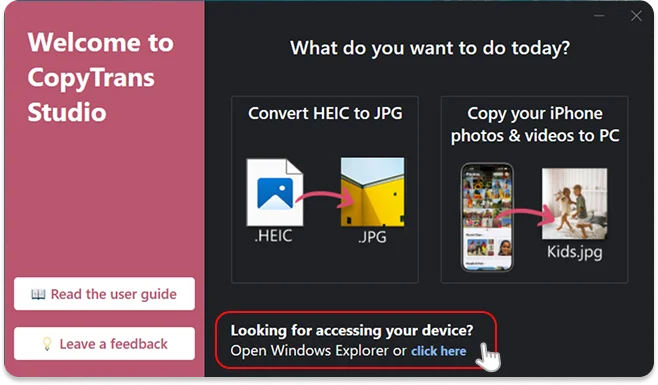
Download CopyTrans Studio- Click on the CopyTrans Studio icon. Open the program.
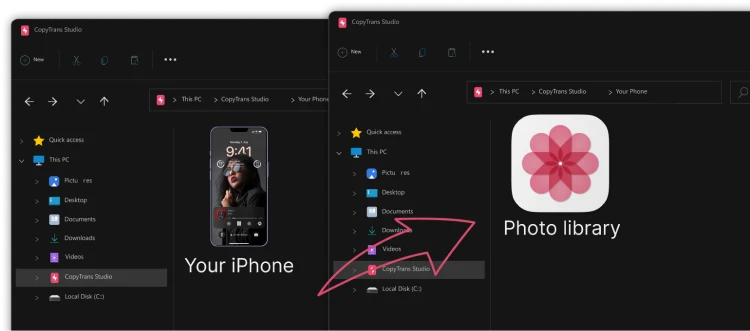
Now choose the device and then click on Photo Library.
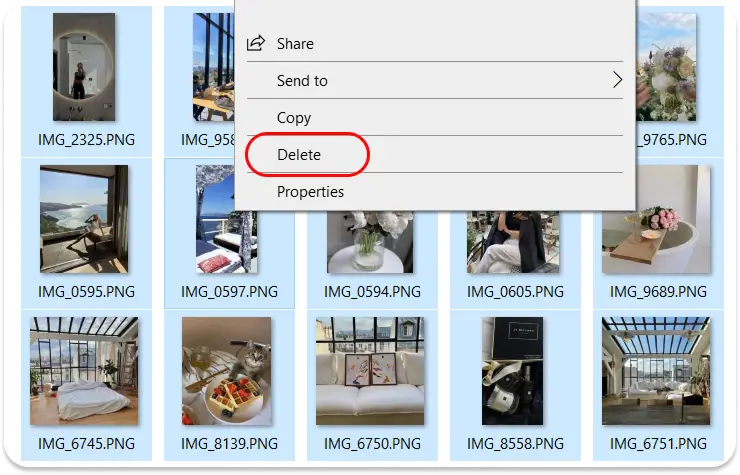
Simply open the folder or album you want to clean up, select the photos you want to delete, and right-click. You’ll see the delete option right there.
Delete all photos from iPhone
Final Thoughts
Both methods work, but they are designed for different situations:
If you only need to delete a small batch of photos, the built-in iPhone tools will do the job. They are simple, familiar, and suitable for quick cleanup.
But if your camera roll has turned into a digital attic filled with years of memories, duplicates, and photos you don’t even remember, CopyTrans Studio is a faster and much more peaceful way to tackle the task. You get complete visibility, smarter sorting, and true one-click deletion without having to tap away at your screen for hours.
After all, deleting photos should be easy and simple. With the right tool, you can clean up your iPhone, free up space, and restore your device to its former glory in a matter of minutes.